


PetPage
4.8149.00 Reviews
App Specs
- Version
- 2.0.23
- Updated On
- License
- Free
- Downloads
- 100,000+
- Developer
- AllyDVM
- Categories
- Medical
- Platform
- Android
Screenshots
 Analysis by AppCompare
I think the most useful way to judge PetPage is not by how many pet-care tools it appears to offer, but by whether it makes a routine visit to your own veterinary practice easier. This is a free medical app from AllyDVM, and its main value is connecting pet information and clinic-related tasks in one place. That makes it a different proposition from a general pet journal: it is most compelling when your veterinarian is part of the way you use it.
Where the speed question really matters
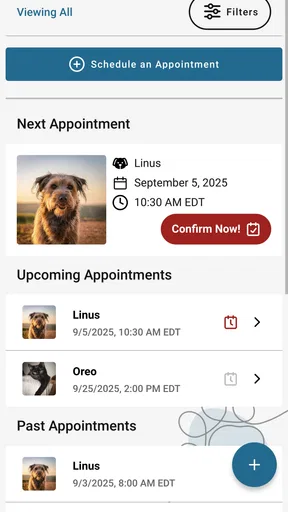
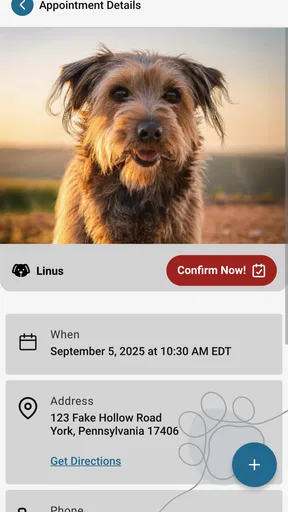
Most visits to a pet-care app are brief: I might open it to check a detail, prepare for an appointment, or find the right information to share. For that kind of use, a clear path to the relevant task matters more than elaborate screens or constant background activity. PetPage is designed around practical actions such as requesting appointments and sharing a Pet ID, so its appeal is the chance to avoid hunting through messages, notes, and old paperwork.
I would still keep expectations measured about what “quick” means. A request made in an app is not the same as a confirmed appointment, and a digital record is only useful if the information is current. I’d treat the app as a convenient channel for communicating with a clinic, not as a promise of instant replies or a replacement for calling when something is urgent.
Busy moments and useful preparation
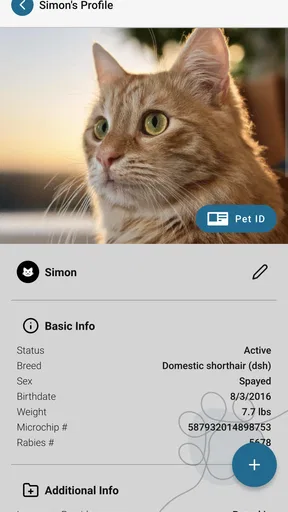
The app is likely to earn its place during the less tidy parts of pet ownership: arranging care while juggling work, finding identifying information when someone else is helping with the pet, or preparing for a vet visit without carrying a folder of papers. The Pet ID is particularly practical to think about before a handoff. If a family member, pet sitter, or another trusted person needs to help, having the relevant identification ready can reduce last-minute scrambling.
A small habit can make this kind of tool more useful: check your pet’s details after a change in care, rather than waiting until the next appointment to discover that something is out of date. I’d also use appointment-request functions early when possible, then keep an eye out for whatever confirmation the clinic provides. That creates a simple distinction between “I sent the request” and “the visit is booked,” which is easy to miss when life is hectic.
Reliability is a shared responsibility
A clinic-connected app depends on more than the phone in your hand. Its practical value can vary with how your veterinary practice uses the service and how promptly your information is handled. I’d confirm with the clinic that it is the right place to submit requests and check whether the details shown in the app match what the practice has on file. That is especially sensible when a pet has a new medical need or a recent change in contact information.
I wouldn’t rely on an app as the only place to keep information that matters in an emergency. For time-sensitive symptoms, contact a veterinary professional directly rather than waiting for a digital request to be reviewed. And if a particular screen or task does not behave as expected, I’d avoid repeatedly submitting the same request; checking with the clinic can prevent confusion about whether it went through.
Worth Reading Before You Choose

EA SPORTS FC Mobile 26 Is a Bigger Football Game, but It Takes Time

Flipboard Shows What News Apps Must Do Beyond the Feed

Switching to Android Auto Means Rethinking Your Driving Routine

Google Calendar Makes a Crowded Week Easier to Manage

Ludo King Makes the Most of the Minutes Between Plans

Baby Panda World Brings Quick Play to Modern Phones, but Its Game Library Feels Busy
Device fit and everyday trade-offs
PetPage is available for Android devices with a minimum OS requirement of 7.0. That gives it room to run on a range of Android phones, though the experience on an older device can still depend on the phone’s available storage, connection, and general condition. The app is also free, so trying it does not involve an upfront purchase, but the more important question is whether your clinic’s workflow makes it useful to you.
At a 4.7 average from around 1,200 ratings, it has a positive reception, and it has passed 100,000 installs. Those figures may help establish that other owners use it, but they can’t tell me whether it fits a particular practice or household. I’d judge it by a simple test: can I find the information I need and complete the task I opened it for without adding another confusing step?
It is also worth separating an app’s responsiveness from the response time of a clinic. A request can be easy to send while still needing a person at the practice to review it. For a routine appointment, that may be perfectly workable; for an urgent concern, direct contact is the better choice. That distinction is more useful than assuming every digital action is handled immediately.
Using PetPage as part of pet care
I find PetPage most useful when I treat it as one part of a pet-care routine, rather than the only place I turn. Before relying on it for a clinic-related task, I’d decide which details I want close at hand and what I’ll do if a matter needs a quicker response. That practical distinction leads naturally to how I’d get started and make the app fit everyday care.
Getting Started
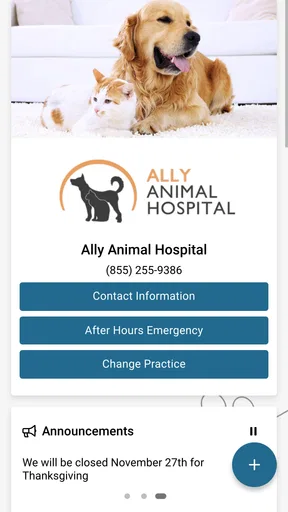
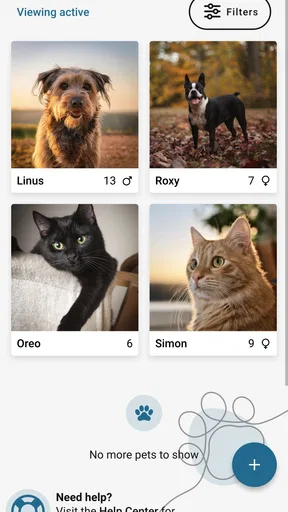
First off, downloading PetPage is a breeze. It’s available on both Android and iOS, making it accessible no matter what device you’re using. Once you have it installed, the setup process is straightforward. You’ll start by creating a profile for each of your pets. This includes adding basic info like their name, breed, age, and a cute profile picture (because why not?). Right from the get-go, the app’s interface is user-friendly and intuitive, making navigation a walk in the park.
Features That Stand Out
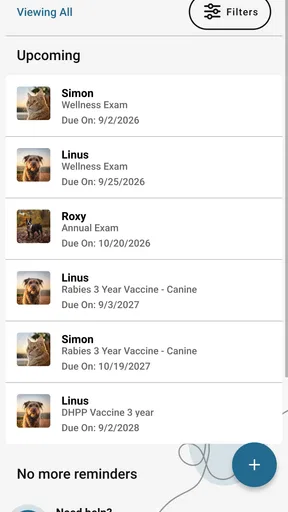
What really sets PetPage apart are its comprehensive features. Not only can you log medical records and vaccination details, but you can also set reminders for upcoming appointments. This is a lifesaver for those of us who tend to forget these things until the last minute. The app also allows you to track your pet’s weight and dietary needs, which is perfect for keeping them in tip-top shape.
Another nifty feature is the ability to connect with your veterinarian directly through the app. You can share medical records, book appointments, and even chat with your vet if any issues arise. This kind of connectivity is a game-changer, eliminating the hassle of phone calls and paper records.
Usability and Design
The design of PetPage is sleek and modern. The developers have clearly taken a minimalistic approach, ensuring that everything is easy to find without unnecessary clutter. The color scheme is pleasant, making it easy on the eyes during prolonged use. Plus, the app runs smoothly without any noticeable lag, which is always a bonus.
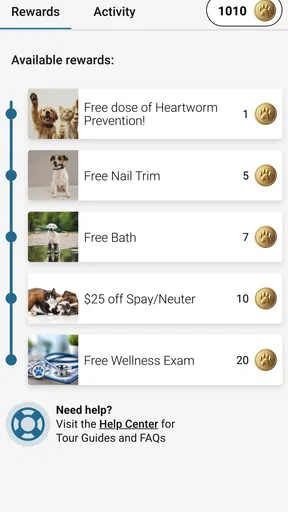
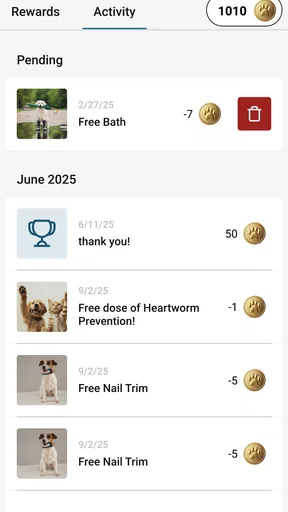
The navigation buttons are well-placed and the icons are self-explanatory, so even if you aren’t tech-savvy, you’ll have no trouble finding your way around. The inclusion of fun animations and pet-friendly motifs adds a charming touch that pet owners will appreciate.
Working with your usual alternatives
Compared with keeping appointment details in a calendar and medical notes in a folder, a clinic-linked service can bring the practical steps closer together. A calendar is still better for reminders that need to appear alongside work or family plans, while a paper copy can be reassuring when a phone is unavailable. I see PetPage as a useful companion to those habits, not a reason to discard every backup.
It also differs from a broad pet diary or social network. If your main goal is documenting walks, meals, or day-to-day behavior for your own reference, a dedicated tracker may suit you better. PetPage makes more sense when you want a route to your veterinary practice and a way to keep pet-related information handy. The best choice depends on the task, rather than on which app claims to cover the most ground.
For a household with several pets, the profile approach can help keep each animal’s details distinct. I’d take a moment to verify which profile is active before sharing information or making a request; that small pause matters when pets have different care needs. If more than one person looks after them, agree on who will update details so that a change does not remain known to only one person.
A realistic routine, and where it may fall short
Imagine I’m leaving work and realize that my dog’s checkup needs arranging. I can open the app, review the relevant pet information, and send a request rather than searching through old texts for the clinic’s details. If I’m collecting the dog from someone else later, the Pet ID gives me another practical item to have ready. I’d still wait for confirmation before treating the appointment as settled, and I’d call directly if the issue had become urgent.
This workflow is most helpful for owners who already visit a participating practice and want fewer scattered steps. It is less attractive if you prefer one universal organizer for every provider, or if your clinic handles everything by phone and does not use the app’s connected tools. In that situation, installing another service may add a login and another place to check without removing much effort.
There is a similar trade-off with records. A central place can make information easier to locate, but only if it is kept accurate and you know which entries are current. I’d use it to support conversations with the veterinarian, not to make a diagnosis or decide that a concerning symptom can wait. For care decisions, professional guidance remains the important part.
Community and Support
One of the most surprising elements of PetPage is its community feature. You can join forums and groups to connect with other pet owners. Share advice, post cute pictures, or simply engage in pet-related banter. It’s like social media, but exclusively for pet enthusiasts.
Support-wise, the app offers a comprehensive FAQ section that covers most issues you might encounter. If you need further assistance, there’s an option to contact customer support directly through the app. The response time is impressive, and the support team seems genuinely keen to help.
Who is likely to get the most from it?
I’d recommend considering it if you want your pet’s clinic-related tasks and identifying information close at hand, especially when more than one person helps with care. It can be handy for owners who are prone to misplacing paper records or who want to make routine requests without starting from scratch each time. The key is to check that your own practice supports the way you intend to use it.
I’d skip it if you are looking for an emergency service, a universal medical record that automatically works across every clinic, or a replacement for a regular calendar. It is also not the right answer for someone who would rather keep all pet information offline and avoid maintaining another account. Those are reasonable preferences; the app’s convenience depends on being comfortable with a digital, clinic-connected routine.
For anyone deciding whether to install it, I’d begin with one low-stakes task: check the pet information you can access or send a routine appointment request, then see whether the process fits how your clinic actually operates. If it saves you a call or makes a detail easier to find, keep using it. If it creates uncertainty about confirmations or duplicates a system you already like, there is little reason to force it into your routine.
Final Thoughts
Overall, PetPage is a must-have app for any pet owner looking to streamline their pet care routine. It’s packed with useful features, boasts a user-friendly design, and fosters a sense of community among pet lovers. While no app is perfect, PetPage comes pretty close by offering a comprehensive suite of tools that genuinely benefit pet owners.
So, if you’re ready to take your pet management game to the next level, give PetPage a try. It might just become your new best friend, second only to your beloved pet!
My bottom line
PetPage is at its best as a practical bridge between an owner and a veterinary practice, rather than as a complete answer to every part of pet care. The current version is 2.0.20, and its Everyone age rating makes it suitable for a broad audience. I’d try it when clinic access and pet identification are the needs I want to simplify, while keeping direct contact and a familiar backup for situations where speed or certainty matters most.
Pros
- User-friendly interface for easy navigation.
- Comprehensive pet health tracking features.
- Custom reminders for vet appointments.
- Secure data storage and backup options.
- Multi-pet management capability.
Cons
- Limited customization for pet profiles.
- Requires regular updates for full functionality.
- Some features locked behind a paywall.
- Occasional sync issues with devices.
- No offline mode available.
FAQs for PetPage
What is PetPage and what does it offer?
PetPage is a comprehensive app designed for pet owners to manage their pets’ health and wellness. It provides features like vaccination reminders, vet appointment scheduling, and pet health records. The app aims to streamline pet care by keeping all essential information in one place, making it easier for owners to ensure their pets are healthy and happy.
Is PetPage available for both Android and iOS devices?
Yes, PetPage is available for download on both Android and iOS platforms. You can find it on the Google Play Store for Android devices and the Apple App Store for iOS devices. This ensures that pet owners have access to the app regardless of their smartphone type, making pet care management convenient for everyone.
Does PetPage have a feature to track multiple pets?
Absolutely, PetPage is designed to accommodate multiple pets. You can create individual profiles for each pet, allowing you to manage their health records, vaccination schedules, and other important information separately. This is particularly useful for households with more than one pet, ensuring personalized care for each one.
Are there any costs associated with using PetPage?
PetPage is free to download and use for basic features. However, it may offer premium features or subscription plans for advanced functionalities. These could include enhanced tracking, personalized health tips, or additional storage for records. Check the app's pricing details in the store or within the app to understand the full scope of any potential costs.
How does PetPage ensure the security of my pet's data?
PetPage prioritizes user privacy and data security by implementing industry-standard encryption and secure servers. This ensures that all personal and pet-related information is kept confidential. Regular updates and security patches are also part of their protocol to protect against any potential data breaches, giving users peace of mind when using the app.


